How To Easily Build Your Own Website Even If You Are Not Techy!!
Nowadays, you don’t have to be a tech wiz in order to build a
website. In fact, you don’t even have to be tech-savvy. Website building
is no longer reserved for the technology experts who know the ins and
outs of computers and can write code. There are easy to use website
builders such as Wix.com
with ready made templates. With drag and drop editors, and endless
choices of templates and functions, anyone can create a professional and
great-looking website within minutes. If you can fill out a form, you
can build your own beautiful and functional website exactly to your
taste!
In the past, professionals and individuals looking to create a
website have been forced to hire expensive professional graphic
designers and computer programmers to do all of the work for them. Not
any more! Building your own site is simple, and will save you tons of
money. You won’t even have to install any programs onto your computer,
because most website building companies are accessible via web browser.
The basic premise of these website builders is easy-use for the
average Joe. These companies have recognized that more and more people
without the skill to build sites are interested in doing so, and they’ve
provided the solution. These new site builders are as simple as the
word processor that you use at home. They make use of pre-set templates
that you can choose, which immediately give you a general outline for
your desired website. You can start with a basic template and then just
follow the simple instructions to customize the design of your site to
your taste. You control everything, including the backgrounds, colors as
well as interesting textures. A simple site can literally be done in a
matter of minutes! Here’s the:
Simple Step-By-Step Process:
Choose a template
Choose images
Upload your text and multi-media
Customize it
PUBLISH!
It’s really that easy. These easy to use website builders
will provide you with all of the technological advancements and options
that an expensive professional would charge you a small fortune for.
And that is not all! Nowadays it is estimated that people spend up to
40% of their Internet time on their mobile devices. The leading Website
building company Wix.com
even gives you the ability to make your site mobile compatible, giving
you the best of all worlds. That’s certainly not a market you want to
miss out on and a feature that professional site builders will charge
extra for.
So what are you waiting for? Don’t be intimidated. Head over to Wix.com and find out for yourself how easy and simple building your dream website can be!
Building a company website is one of the most important parts of
creating a successful business. It doesn’t make a difference if your
company is based on the internet or a traditional brick-and-mortar
business, an online presence is a requirement to reach and expand your
customer base. But designing a website can be time consuming and
expensive. Web designers are difficult to work with, and even though
you’re paying them, they’re really only working for themselves. There
are cheaper ways to establish your company online, and Wix.com stands out amongst them.
Wix.com offers free HTML5 and Flash website design that you can do on
your own, without having to pay for a pricey web designer. With
unlimited space for as many pages as you want, customized looks, photo
galleries, animations, and blog platform capabilities, social networking
buttons, Wix has everything a business of any size needs to make an
impact online. You get full control over what information fills in the
blanks, and you don’t have to know a thing about HTML to make this work.
The way your website looks says a lot about your company. Wix does
that, and it does it for free.
You need your website to look professional, and to communicate your
brand to the world. Wix lets you create a website that does all that and
won’t make you go bankrupt. All of the 280 templates available on Wix
are professional grade web design without the pricey web designer.
Another thing that makes Wix the most affordable option in creating a
website is that you don’t have to pay for a separate web host—every page
created on Wix is hosted on Wix, free of charge.
The internet is the marketplace of ideas: your company needs to share
what you think. If you think just because you don’t sell a product
online you don’t need a website you’re dead wrong. Thinking like that is
the equivalent of not advertising because you can’t buy your product
from an ad, or not having a business card because people can always look
up your number in the phone book—it doesn’t make sense. No matter what
kind of business you have, if you want to reach an audience you want to
have a website that speaks to people. Wix lets you do that as quickly
and easily as possible for free.
If you have a bigger budget, Wix has more options than just the free
web sites design. You can choose to upgrade to the ad-less version which
won’t clutter up your customer’s screens when they visit your site. But
if the most important thing to you is getting your company’s name
online right now, try Wix.com today.
Facebook Debuts a new tool to help you understand and control your privacy settings on the site.
On Thursday, Facebook released a new tool to help you understand and control your privacy settings on the site.
First announced back
in April, the Privacy Checkup tool lets you see and adjust who can view
your data, as well as which apps can access it. It is navigated,
curiously, with the help of a nameless blue dinosaur –– let’s call him
Clippyosaurus –– who pops up now and then and reminds you to review your
privacy settings to “make sure they’re set up the way you want.”
“Today, we’re starting to roll out Privacy Checkup, which helps you review and control who you’re sharing with.
“We know you come to Facebook to
connect with friends, not with us. But we also know how important it is
to be in control of what you share and who you share with.”
The release is likely a move for Facebook to improve its public image, which has been marred by severalprivacyscandals in the past several years.
The Privacy Checkup tool
attempts to both simplify the process of changing your sharing settings
and demystify whom you’re sharing with.
The tool isn’t a cure-all. While
it might help you better understand what you’re sharing and with whom,
for example, it doesn't change the fact that Facebook farms out your
detailed personal data to advertisers for profit by default.
Anyway, below is a quick run-through of how the tool works:
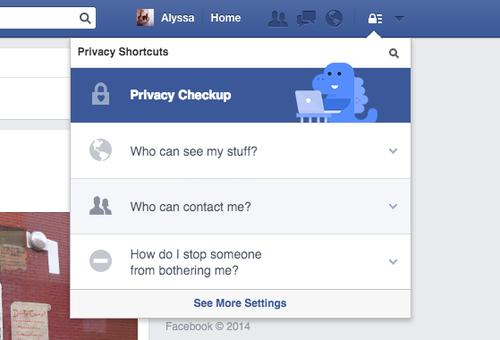
When you access your privacy
settings via the lock symbol in the upper-right corner of Facebook’s
navigation bar, your (Mac-using?) dinosaur friend will appear and be
like, “Hey, privacy, blah blah blah.
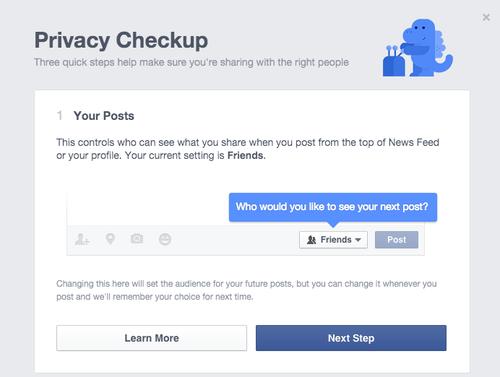
After you click Privacy Checkup, a box will pop up on your screen. Via this tool, you can monitor Your Posts, Your Apps, and Your Profile.
The first page is a basic run-through of who can see the updates you write on your page.
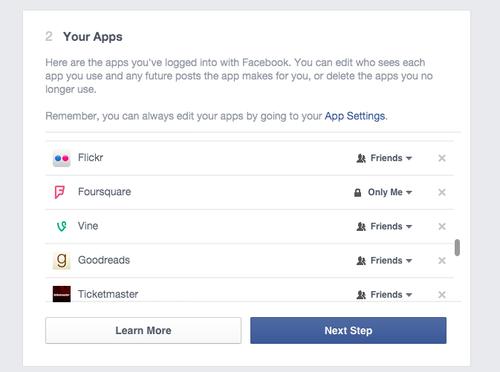
The second is a survey of which
apps are connected to your Facebook. I’ll admit it’s nice to have quick
access to this, as I often try out an app once or twice and then forget
about it. With this tool, I can remove its access to my data with one
click. You can also adjust who sees your activity on the app.
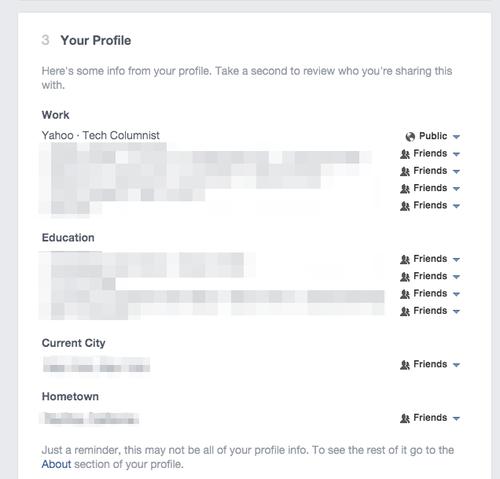
Finally, you’re shown all the basic personal info on your profile and given the choice to adjust what it says and who sees it.
That’s all it does! At the very
least, this simplifies the convoluted process of adjusting your privacy
that’s caused so many problems in the past.
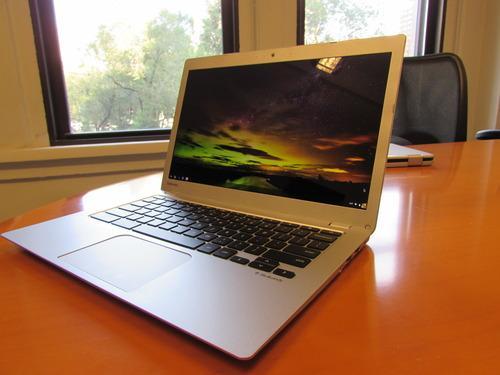
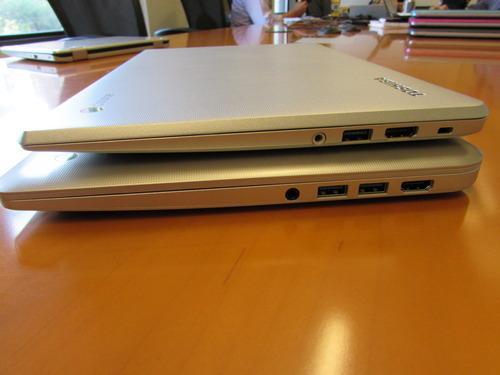
The first Chromebooks — laptops running Google’s Chrome operating system — were heinously unattractive and clunky. But the newer models are stylish, well-built laptop alternatives. Case in point: Toshiba’s new Chromebook 2.
Unveiled today at the IFA
consumer tech conference in Berlin, the Chromebook 2 packs a 13-inch
display into a small, slim body. It is far thinner and lighter than its
predecessor, the aptly named Toshiba Chromebook, which was a quality system in its own right.
With
a finely textured, plastic chassis, the Chromebook 2 is attractive even
by high-end notebook standards. While the original Toshiba Chromebook
was geared toward productivity users, company representatives tell me
the Chromebook 2 is meant more for multimedia users.
Toshiba has equipped the
Chromebook 2 with a gorgeous 1080p display. Picture quality is
excellent. The Chromebook 2’s screen also uses what’s called IPS display
technology, which means it should be readable even in direct sunlight.
I didn’t get to check this
out during my brief hands-on, although it’s worth noting that the
display looked good from all angles; it didn’t fade when looked at from
the side.
Seen and heardThe
Chromebook 2’s speakers are no longer on the bottom of the notebook,
but instead positioned so that the audio is forced toward the user.
We’re told that the folks at Skullcandy tuned the speakers. Based on a
quick listen, they sound much better than the original Chromebook’s.
Inside,
the Chromebook 2 gets one of Intel’s Bay Trail Celeron processors,
which Toshiba says should get you nine or more hours of battery life.
We’ll have to wait until we get our hands on a unit to verify this.
Base
configurations of the Toshiba Chromebook 2 will cost $249 and include a
720p display and 2 GB of RAM. Jump up to the $329 model and you’ll get a
1080p display and improved performance thanks to 4 GB of RAM.
That’s a good deal for a solid, good-looking Chrome-based laptop.
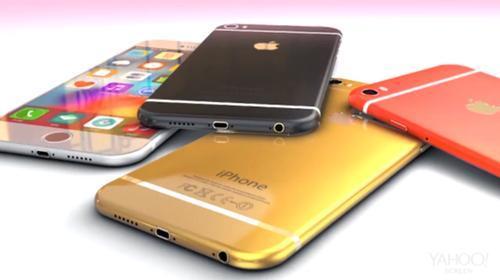
Apple’s iPhone 6 will reportedly
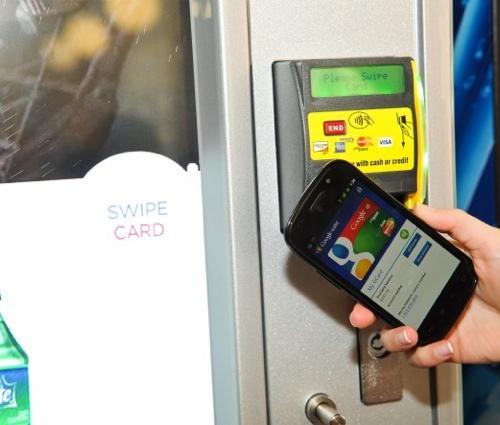
be getting something called near-field communication, or NFC. The
feature, which is already available on many Android and Windows Phone
handsets, allows owners to wirelessly pay for items at checkout counters
and pair the phone with other devices, among other cool things.
In fact, recent reports claim
that Apple has signed deals with American Express, Visa, and MasterCard,
which will turn the iPhone into a so-called “virtual wallet.” That
capability will likely run through NFC.
What
follows is a short explainer on what NFC is, how it works, and why you
should care about it. So put your learnin’ caps on, and let’s get
started.
OK, what is NFC?
NFC is a form of wireless communication that allows the flow of information between two devices. The technology, according to the NFC Forum, comes in three flavors: tag reader and writer, device to device, and card emulation.
Tag reading lets companies
place small, inexpensive NFC-enabled tags on things such as movie
posters that people can scan with their smartphones to do things like
watch trailers. You could also, for example, tap your phone on an
NFC-enabled coupon tag in a store to get special offers.
Device-to-device NFC communication lets your phone talk to another person’s phone so you can trade photos or videos. Device-to-device
NFC can also be used to pair your phone with a wireless speaker or
printer. And because NFC and Bluetooth are interoperable, you can use
NFC to quickly pair your phone to a compatible Bluetooth device.
The
biggest potential for NFC lies in card emulation. Using what’s called a
secure element that randomly cycles security pins, you could use your
NFC-equipped iPhone 6 to pay for your groceries by tapping the handset
on a special pad at the checkout counter.
So why hasn’t Apple used NFC before?
Mobile
wallets like Google Wallet and ISIS have been trying to jump-start the
NFC payment craze for a while now, with little to no luck. Sure, it
would be convenient to tap your phone to quickly pay for something and
be on your way, but in order for that to happen, both your phone and the
store you’re shopping in need to have NFC capabilities.
If your phone has NFC and the checkout counter doesn’t, then you can’t pay with your handset. It’s as simple as that.
What’s more, Apple’s Senior VP Phil Schiller told AllThingsD
during a 2012 interview that the company didn’t see NFC as a solution
to any specific consumer problems, adding that Apple’s Passbook met
customer needs at the time.
Why the change of heart, then?
Since
Schiller’s interview, Apple has been making headway in brick-and-mortar
stores with its iBeacon technology. iBeacons are little gadgets that
you can place anywhere and that can help your iPhone recognize your
location in a shop and provide you with nearby sale items and specials.
What’s more, as Wired recently pointed out,
Apple has more than 800 million credit cards on file from users’ iTunes
accounts. And in January, Apple CEO Tim Cook even went so far as to say
the company was “intrigued” with mobile payments.
According to The Information,
Apple has also been in talks with major credit card companies about
using a secure element in its phones for use with mobile payments. And
recently Wired, tech blog Re/code, and Bloomberg all reported that credit card payment capability was coming to the next iPhone.
What about Apple Passbook?
If
you’re a Passbook user, you’ve got nothing to worry about. It’s likely
that Apple’s NFC payment solution would tie into the company’s existing
virtual wallet.
For the uninitiated,
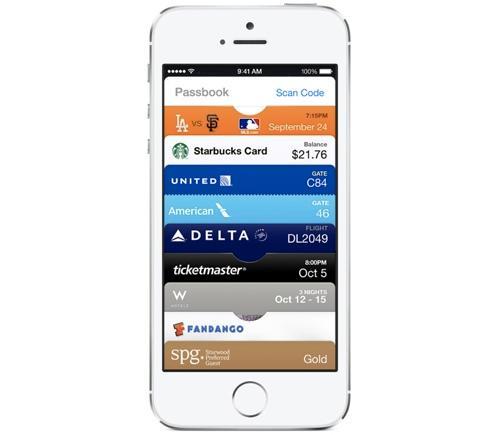
Passbook is an iOS app that allows you to store things like coupons,
loyalty cards, airline tickets, and so on. It’s a nifty piece of
software, though with the addition of NFC payments, it could become one
of the iPhone’s best features.
How likely is NFC to be included with the iPhone 6?
Based
on all the reports circulating about the feature, not to mention the
above statements from Tim Cook and Apple’s discussions with credit card
companies, it’s looking like the iPhone 6 will almost certainly include
NFC.
What if I own an older iPhone?
Sorry,
but you won’t be able to take advantage of the new credit card
capabilities. Current iPhones don’t contain NFC technology, so they
can’t take advantage of any new app or system that Apple may introduce.
You’ll have to upgrade to an iPhone with NFC installed –– if Apple does,
in fact, introduce one.
Either way, we’ll find out for sure if you’ll start paying for things with your iPhone on Sept. 9, when Apple will unveil its iPhone 6. Stay tuned.
Whether it’s video editing, CGI animation or application and game development, the Dell UltraSharp 32 Ultra HD Monitor - UP3214Q lets you hone in on the fine details and give your work the attention it deserves.
See more in Ultra HD 3840 x 21601. That’s four times the resolution of Full HD.
With extremely high pixel density, the tiniest details in videos and images are revealed, providing a whole new level of clarity.
Do more with a 31.5" screen , giving you more comfortable room for your biggest projects.
Get a clear and consistent view with an ultra-wide 176°/176° viewing angle.
Keep your virtual workspace tidy with the Dell Display Manager’s Easy Arrange feature that lets you neatly display windows side by side.
Exceptional color precision and consistency
Featuring PremierColor, the UP3214Q offers superb color accuracy and high-end professional features.
Work confidently knowing your monitor is compatible with major industry color standards and has wide color coverage such as 99% AdobeRGB and 100% sRGB.
Get exceptional color accuracy and consistency, right out of the box, with precise factory calibration to a Delta-E<2.
Reveal a high level of detail, even in dark areas, with a color depth of 1.07 billion colors.
Fine-tune your colors using the Custom Color mode, or make further adjustments with the user-accessible hardware look-up table (LUT).
Calibrate the monitor in-house using Dell UltraSharp Color Calibration Solution software with the optional X-Rite i1Display Pro colorimeter2(sold separately).
Flexible viewing and connectivity
Quickly adjust your monitor to comfortably fit the way you work.
Tilt, swivel and adjust the height of your monitor to maximize viewing comfort.
Get extensive connectivity with HDMI, DisplayPort, mini-DisplayPort, USB 3.0 and a 6-in-1 media card reader.
Eco-conscious design
The Dell UltraSharp 32 Ultra HD Monitor - UP3214Q meets thelatest regulatory and environmental standards.
ENERGY STAR® Qualified
EPEAT® Gold3Rated
TCO Certified Displays
Made with premium-quality materials, the Dell UltraSharp 32 Ultra HD Monitor - UP3214Q is BFR/PVC-free (excluding external cables) and has arsenic-free glass, a mercury-free LED panel, a chassis made of more than 25 percent post-consumer recycled plastics and easily recyclable aluminum
Enhanced power management
Manage power consumption wisely with PowerNap, enabled through the Dell Display Manager to either dim the monitor to the minimum brightness level or put it into sleep mode when it is not in use.
Accessories
You can maximize the versatility, performance and security of your Dell UltraSharp 32 Ultra HD Monitor - UP3214Q with extras like a colorimeter, stereo soundbar and a premium lock. You’ll find just what you need at Dell.com.
X-Rite i1Display Pro colorimeter: Get precise colors that match your work with what you see onscreen using a fast and flexible colorimeter.
Dell USB Soundbar | AC511: Snap the Dell Soundbar snugly to the bottom of your monitor to enjoy rich, stereo sound.
Dell Premium Lock | LP500: Secure your monitor with a super-strong, carbon-tempered steel cable lock that easily attaches to your monitor’s standard security lock slot.
Intel Core M chip unveiled: Say hello to thin, fanless hybrid notebooks..
The 2002's Tablet PC
was a thick and clunky eight-year early tablet based around Windows XP
Tablet Edition and failed to get any traction outside of businesses.
Both
companies made a fatal error at the time – they believed that people
wanted tablets to do everything that a PC could. And, of course, that
meant running Windows. Caught off guard by Apple's iPad, both companies
knew they needed to do something.
The merits of Microsoft's Windows 8
efforts aside, Intel's strategy was to go after the lightweight fanless
market with Atom and a spin on Ultrabooks with 2-in-1 tablet designs
(like Lenovo's Yoga range and Surface Pro 3, for example), essentially tablets with detachable keyboards
The
Atom experiment was a disaster; some of the designs from well-known
OEMs offered an extremely poor user experience for using Windows 8. The
CPU just wasn't up to the job.
The 2-in-1 market, however, is a
sizable area of potential gain for Intel. The market is still very
young, but the signs are encouraging – 50 per cent of people that have
bought a 2-in-1 say they were previously considering a tablet, while
there are more 70 system designs now on the market across all screen
sizes. 2-in-1s are for people that still want to use x86 and x64 apps
and have a device that can be used as a tablet.
While
Intel has long produced CULV (Consumer Ultra-Low Voltage) processors
for tablets including the Haswell Core i3, i5 and i7 variants in the Surface Pro 3, something still needed to change. Intel has the computing power, but battery life was a major weakness until now.
Enter the 14 nanometer die shrink of Haswell.
Codenamed Broadwell, this is a launch that – relatively unusually for
Intel in recent times - has been delayed, and after originally being
promised the bulk of the CPUs (including those for desktops and full
laptops) in late 2014, these will most likely hit in early 2015 (Intel
says they "will be in volume production before year end"). We expect
them to see a full launch at CES 2015.
But today sees an advance party for Broadwell in the form of Intel Core M.
These Broadwell CPUs are designed specifically for tablets and 2-in-1s
as well as very thin laptops (whether they'll fit into the Ultraboook
category remains to be seen).
And they're fanless, yet with
Core-level performance. The key to this is 14nm die shrink that has
enabled the TDP (thermal design power) of the system-on-chip to sink
below 6W and even down to 4.5W depending on design.
This
compares to TDPs of 17-18W only a couple of years ago. Improved
packaging also enables more compact designs – the equivalent Haswell
Core package was 960mm^2, whereas Core M's packaging is almost half
that. This translates into designs that are designs that are thinner
than 9mm.
Intel sees the biggest market for 2-in-1s are people who bought a PC around 3-5 years ago and who are now looking to upgrade.
Intel
also believes Core M powered devices can entice those who were
previously just looking for an Android or iOS tablet, but who value the
multitasking value of Windows, flexible file storage and capabilities of
a full Windows PC.
Core M is available in dual core versions for
now, the latter having 1.3 billion transistors. 4MB of L3 Cache is
shared across the cores and the on-die graphics. Core M utilises Intel's
HD 5300 Graphics which supports resolutions up to 4K (3,840 vs 2,160).
There
are three variants of the Core M; 5Y70, 5Y10a and 5Y10 (capable of
going to 4W). The key difference is the clock – 2.6Ghz for the 5Y70,
while the others are 2.0Ghz. All these chips are dual-core, four thread
processors but expect some other variants as time goes on.
With
Core M, Intel is promising performance improvements for graphics and
video of 7% and a more modest increase of around 2% for productivity
tasks over 'a four year-old notebook' – that's comparing a Core M-5Y70
with the Core i5-520UM chip. The key thing here though is that there has
been a significant reduction in TDP, 18W vs 4.5W.
That
power reduction means a significant uplift in battery life – Intel is
talking somewhere in the region if 1.7 hours versus a previous
generation system. As you can see from this chart, the main power
consumer is the screen (no surprise), but Broadwell brings a distinct
saving when it comes to the system-on-chip as well as, interestingly,
audio. This is down to Intel's SmartSound audio processing technology
that enables features such as wake -on-voice.
Also
part of the Core M platform is 802.11ac wireless (Intel Wireless-AC
7265) and 5Y70 is compatible with Intel's vPro for business deployments,
Windows InstantGo and Platform Trust Technology. There's also support
for Intel's Rapid Storage tech.
As for pricing, Intel is
predictably talking about the 2-in-1 market predominantly – machines
around the $900 mark (around £550, AU$950). But Intel reckons Core M
could easily be homed in cheaper tablets – those around the $500 mark
(around £300, AU$530) - and we'll have to wait to see what OEMs announce
in due course.
Intel says somewhere in the region of 20 system
designs are being developed using Core M and a handful of systems will
arrive in October across both consumer and business SKUs. The first of
these – launched at IFA 2014 - is the new-generation Lenovo ThinkPad Helix 2 in 1 that clocks in at 800g. It's 9.6mm thick, with a 11.6-inch Full HD display.